Version History
Superset can record the history of a chart or dashboard as you edit it, and let you look at, restore, or branch from any earlier version.
The panel lists each saved version with its author, timestamp, and a plain description of what changed — "Chart renamed to Q3 Revenue", "Added filter on 'Region'" — rather than a raw diff. You can search the history and filter it down to changes on the entity itself or on the things it depends on.
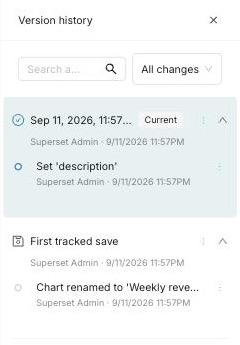
This screenshot illustrates the panel in an earlier build. Its First tracked save label predates the starting-version labels described below.
The version history panels described here apply to charts and dashboards. Datasets do not have a dedicated history panel, but their edits are captured by backend versioning and exposed through the dataset version APIs and related activity. Datasets also participate in soft deletion and can be recovered from Recently Archived.
Enabling and disabling it
| Setting | Type | Effect |
|---|---|---|
VERSION_HISTORY | Feature flag | Enables chart and dashboard version history UI and its supporting APIs |
ENABLE_VERSIONING_CAPTURE | Config value | Records versions as entities are saved |
Both default to on. To turn the feature off:
# superset_config.py
FEATURE_FLAGS = {"VERSION_HISTORY": False}
ENABLE_VERSIONING_CAPTURE = False
Restart Superset and its workers for the capture change to take effect.
With VERSION_HISTORY off, the version-list, version-snapshot, activity, and
version-restore endpoints return 404 for callers who pass the existing route
permissions. The flag does not grant access: when enabled, route permissions
and object-level editorship are still required.
Disabling only capture leaves existing history readable when VERSION_HISTORY
is enabled, but Restore is unavailable (404). Disabling only
VERSION_HISTORY does not stop capture or retention, and does not change
ordinary chart, dashboard, or dataset CRUD or soft-delete recovery.
Hosts can separately configure VERSIONING_CAPTURE_PREDICATE, a callable
receiving the SQLAlchemy session. Its default, None, preserves capture behavior.
A false decision skips baseline, shadow, association-history, and change-record
writes while ordinary ORM saves still persist. Version restore returns 404 when
capture is denied. The startup ENABLE_VERSIONING_CAPTURE kill switch still wins.
The host must keep decisions tenant-local and stable for a transaction, handle
expected service outages, and bound any cache to the transaction/request. This
hook does not govern retention or delete existing history.
Host integrations can require superset.versioning.utils.HOST_POLICY_API_VERSION
equal to 1 before installing policies. This contract includes the version API
feature gates, transaction-scoped capture and restore, canonical retention key,
and authoritative soft-delete retention callback. A downstream host must adopt a
core revision providing the entire contract, not only configure a UI flag.
Imports and background ORM writes use the same predicate; hosts must supply their tenant context there too. Bulk SQL retains its existing capture limitations. After re-enabling, skipped edits are not reconstructed. If an entity has no history, its first enabled edit records the existing pre-edit baseline of its then-current state; an entity with history resumes with its next captured change.
Disable them together: capture off with the UI left on gives a panel that stops filling — an empty or stale history misrepresents the entity as unchanged. History only accrues while capture is on; edits made while it was off are not reconstructed.
Retention
The version_history.prune_old_versions background task prunes expired
history. The default Celery beat configuration schedules it daily at 03:00
in the configured Celery timezone. It runs only when beat and workers are
running with the required schedule and task registration; see the
operator checklist.
History retention is configured independently with VERSION_HISTORY_RETENTION_DAYS
in superset_config.py or the environment variable of the same name. Its default
is 30 days; set it to 0 to disable pruning. The scheduled retention task preserves
live versions and prunes eligible closed history older than the configured window.
The released SUPERSET_VERSION_HISTORY_RETENTION_DAYS key remains a deprecated
fallback: its positive window is preserved and any nonpositive value still
disables pruning. Migrate a legacy -1 or other negative disable to the new
key with value 0. An explicit new -1 instead makes closed history eligible
on the next scheduled run, and logs a startup warning.
If a custom config star-imports Superset defaults and keeps both keys, an
inherited new 30-day value is ambiguous; the safer disabled or longer legacy
window wins. Remove the old key when explicitly migrating in that config.
The environment seed accepts -1 through 36500. An absent value defaults to 30
days; invalid supplied values, including non-integers and values outside that
range, defer pruning with 0. Changing retention does not enable history access
or capture.
A value set in superset_config.py follows the same rules. It is checked when
the configuration loads and again each time the task runs: a non-integer or
out-of-range value logs a warning and defers pruning with 0. It neither fails
the run nor falls back to 30 days. Restart the relevant processes after changing
environment or configuration values.
Pruning preserves live version rows and their anchoring transactions, regardless of age. It does not preserve every historical row that shares one of those transactions: closed rows can be removed when their closing transaction expires. Retention can therefore remove history used by previews and restores; version history is not a substitute for backups.
There is no dry-run switch for this task. Neither VERSION_HISTORY nor
ENABLE_VERSIONING_CAPTURE disables pruning of existing history. To preserve
history while the feature is off, set the retention value to 0 and leave the
task's beat schedule entry in place: removing the entry logs a missing-schedule
warning at every startup.
Both retention settings accept -1 for immediate eligibility on the next normal
cleanup run, not immediate execution. The cutoff is the run's clock: future-dated
rows remain ineligible. Current versions and live entities remain protected;
soft-delete purge still requires a deleted entity and passes the normal cascade,
dependency, feature-gate and dry-run checks. Other negative values are invalid.
Archived entity cleanup is separate: SOFT_DELETE_RETENTION_DAYS defaults to
30 days when absent and accepts the same-name environment seed (-1 through 36500;
0 disables scheduled purge). Invalid or oversized supplied values defer scheduled
purge with 0. A host can install SOFT_DELETE_RETENTION_DAYS_FUNC to supply
an authoritative integer window before the stored CLI override. Invalid or
unavailable callback results defer purge with 0; they do not use stored values.
Without that callback, the stored CLI window still takes precedence over config.
The CLI rejects windows outside -1 through 36500. Malformed or oversized stored
windows and runtime config values defer scheduled purge with 0, preserving data
until the operator corrects the window. Only an absent stored window falls back
to config; only an absent config setting uses the 30-day default.
Runtime invalid-window resolutions and host-policy failures emit the
deletion_retention.invalid_window counter and a warning; intentional 0 does
not emit this counter. It counts resolutions, including CLI and client-config
reads, rather than cleanup runs. Invalid environment seeds are converted to 0
at startup and reported by a startup warning instead.
This does not change explicit force-purge or supply downgrade grace protection.
Operator steps for archived objects are on
Recently Archived.
Permanent purge also removes the purged object's related version-history records,
regardless of VERSION_HISTORY_RETENTION_DAYS or the separate history-pruning
schedule. Setting history retention to 0 disables scheduled history pruning,
not this purge cascade. For example, with soft-delete retention of 30 days and
history retention of 180 days, permanently purging an object after its soft-delete
window also removes its associated versions, even those younger than 180 days.
A longer history window does not extend deleted-object recovery: application
restore is unavailable after permanent purge. This cleanup is scoped to the
purged object and its owned/association history, not unrelated entities' history;
shared version transactions are removed only when no surviving history uses them.
Viewing history
An unstamped starting version is labelled Starting version: older history cannot reliably distinguish an original creation from a retroactive baseline. Explicitly recorded baselines and imports retain their Original version and Imported labels. New tracked creations and clones are labelled Created; older unstamped history is not relabelled retroactively. Older entries without an explicit creation classification can retain Cloned or First tracked save labels.
On a chart, open … (actions) → View version history in Explore. A dashboard uses the same entry in its own … (actions) menu.
The entry appears for users who may edit the entity — the same rule the server applies to overwriting it: administrators, plus anyone whose subjects are among the entity's editors. Users who cannot edit do not see the panel.
This rule is enforced by the server, not just reflected in the UI: the version and activity endpoints refuse users without edit rights on the specific entity, so a read-only user cannot retrieve an entity's history through the API either. Embedded guest tokens are refused outright, regardless of any editorship their role might carry.
One entry can appear that nobody typed: the first save through the chart editor of a chart created by an older Superset version, an import, or the API may record a one-time settings-migration entry alongside the user's change, as legacy settings are rewritten to their modern form. On a chart opened normally in Explore almost none of that rewrite is recorded — at most, a removed legacy setting may appear as cleared; when Explore is reached from a dashboard, a shared link, or a URL that picks the chart type, a first save can carry more of these automatic rewrites. It happens at most once per chart per upgrade, and later saves record only what the user changed.
The open history panel refreshes after a successful save; you do not need to close and reopen it to see the new version.
Previewing a version
Selecting a version loads it into the page so you can see it before deciding anything.
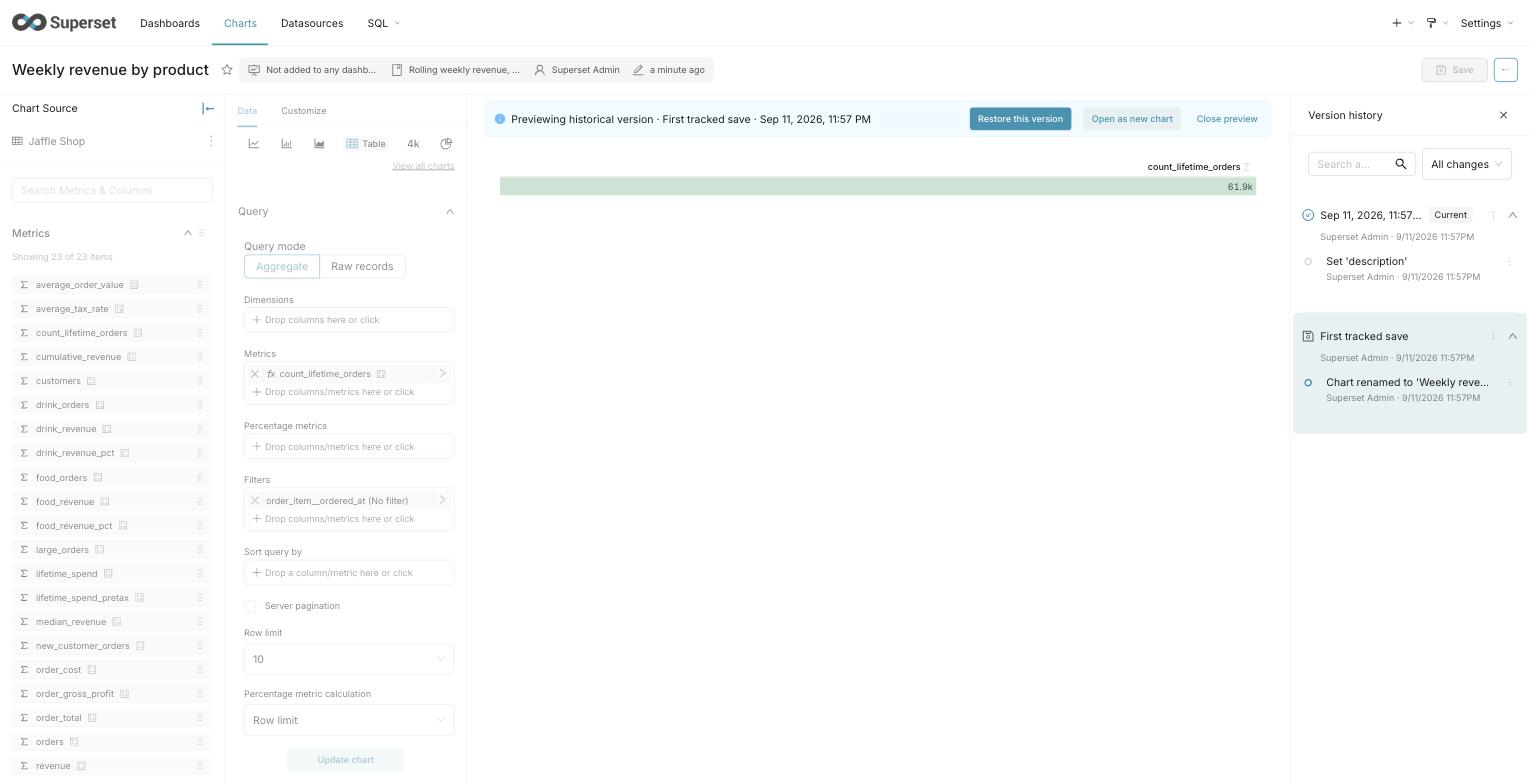
This screenshot illustrates the preview actions in an earlier build. It uses the older First tracked save label. The live group retains its Current label.
While a preview is active:
- A banner across the top marks the page as historical and names the version.
- The dashboard or chart itself is inert — filters, controls, and chart interactions are disabled, so nothing you click can be mistaken for editing the live entity. You can still scroll, and still move between tabs.
- Saving is unavailable. Preview never writes.
Close the preview to return to the live version, along with whatever filter selections you had before you opened it.
A dashboard preview reconstructs the layout as it was, including charts that have since been removed from the dashboard. A chart that has been deleted outright cannot be reconstructed; its slot shows a placeholder instead.
Preview is a close approximation of the version, not a pixel-faithful replay. The dashboard's own saved properties — title, CSS, metadata, description, slug, certification, draft or published state, and theme — are shown as they were. Charts, though, render with their current definitions rather than the definitions they had at that version, and a dashboard's chart membership is reconstructed from the saved layout, so charts that belonged to the dashboard without appearing in the layout are not represented. Restore applies the full captured state, so a restored dashboard can differ from its preview in these respects.
Restoring a version
Restore rewrites the entity back to the selected version. Two things are worth knowing:
- Restore appends a version. Restoring does not itself delete the states you moved away from. Returning to one of those states depends on its history still being available; retention and permanent deletion can remove it.
- A dashboard restore may be partial. If the version referenced charts that have since been deleted, the layout is restored without them and Superset tells you how many were not reattached.
Restoring is offered to the same users who may edit the entity, and is withheld from externally managed entities, whose source of truth lives outside Superset and would overwrite the restore on the next sync.
Opening a version as something new
Use the … (actions) menu on a save-group header to open that version as a new chart or dashboard. Individual field-change rows preview the version; they do not have separate action menus.
Open as new creates a brand-new chart or dashboard from the selected version and leaves the original untouched. This is the safer option when you want an old state back but are not certain you want to give up the current one.
How much of the version comes across differs by entity, because the two copy paths do. A new chart is built from the version itself: its name, visualization type, dataset, controls, query context, description, and cache timeout. A new dashboard is a copy of the live dashboard with the version's title, CSS, metadata, and layout applied over it — the copy endpoint accepts only those fields, so properties such as description, slug, certification, and theme come from the dashboard as it stands today, not from the version.
What gets recorded
Versions capture the entity's own saved state — a chart's name, visualization type, and controls; a dashboard's title, layout, filters, and properties.
The timeline also shows related activity: changes to things the entity depends on, such as the dataset behind a chart. These are shown for context and cannot be restored from the entity's own history — restore acts on the entity you are looking at.
Changes made outside a save, such as ownership or permission edits, are not part of version history.
Resuming capture after a disabled interval
When a dataset or dashboard snapshot is saved with capture enabled, its child state is reconciled at commit: dataset columns and metrics, and dashboard chart membership. This lets a snapshot taken after an uncaptured interval restore the state present when that snapshot was saved. It does not recreate the missing edit events or create change records for children the resuming save does not itself modify. When that save does modify a child, its recorded diff can include changes from the disabled interval. Dashboard membership reconciliation never overwrites shared chart content.
Reconciliation is part of the same transaction. If it fails, the save fails and must be rolled back; an incomplete snapshot must not be presented as restorable. Earlier snapshots are not repaired retrospectively. If capture was disabled before this behavior was deployed, older snapshots spanning that interval may lack child or membership history and should not be used for restore.